Chrome 拡張機能 Chrome Extension

ローカルMarkdownを、
最も美しく、最も自由に。
Read local Markdown files —
beautifully, freely, your way.

Markdownプレビューに物足りなさを感じていませんか。25テーマ、日本語フォント、フォルダ管理、ライブ同期——妥協しないプレビュー環境を、ブラウザの中に。 Tired of bare-bones Markdown previews? 25 themes, Japanese fonts, folder management, live sync — an uncompromising preview environment, right in your browser.

25 テーマ 25 Themes 170+ 言語 170+ Languages 日本語フォント JP Fonts ライブ同期 Live Sync タブ管理 Tab Management レビュー & AIエクスポート Review & AI Export
chrome-extension://rich-markdown-preview
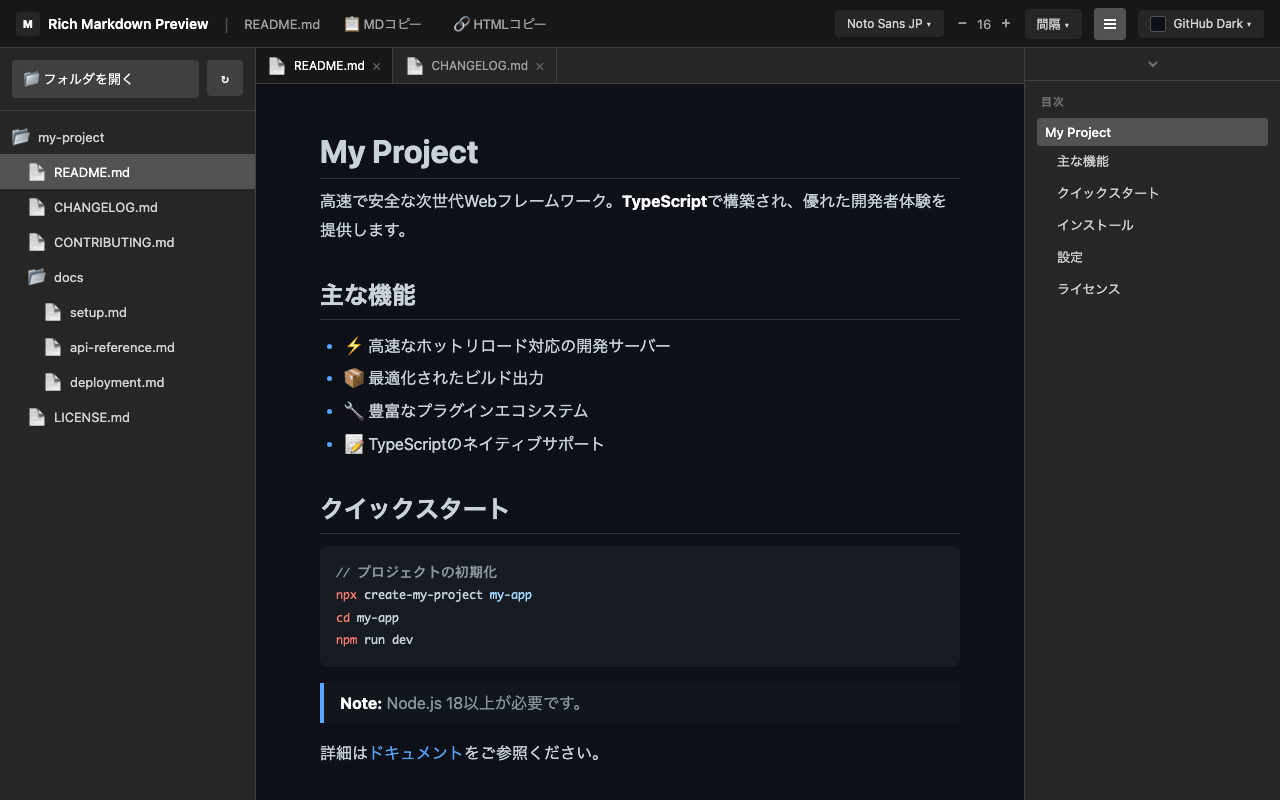
Rich Markdown Preview main interface
📖 レンダリング & テキスト設定 Rendering & Text Settings

美しいMarkdownレンダリング Beautiful Markdown Rendering

テーブル、リスト、引用、画像を美しくレンダリング。日本語フォント5書体やフォントサイズ、行間、文字間隔まで細かく調整でき、あなただけの読みやすさを実現します。 Beautiful rendering of tables, lists, blockquotes, and images. Switch between 5 Japanese fonts, fine-tune font size, line height, and letter spacing for your perfect reading experience.

  • 日本語フォント5書体をワンクリックで切り替え 5 Japanese fonts switchable with one click
  • フォントサイズ 12〜32px で自由に調整 Font size adjustable from 12–32px
  • 行間 1〜3倍、文字間隔 -0.05〜0.2em で細かく設定 Line height 1–3×, letter spacing -0.05 to 0.2em
preview
Markdown rendering preview
📑 目次 TOC

目次の自動生成 Auto-Generated Table of Contents

H1〜H6の見出しから目次を自動構築。クリックで該当箇所へスムーズスクロール。スクロール位置に応じて現在の見出しをリアルタイムでハイライトし、目次パネルも現在位置に自動スクロール。 Automatically builds a table of contents from H1–H6 headings. Click to smoothly scroll to any section. Real-time highlight of the current heading based on scroll position, with the TOC panel auto-scrolling to keep the active item visible.

  • H1〜H6の見出しから目次を自動構築 Auto-builds TOC from H1–H6 headings
  • クリックで該当箇所へスムーズスクロール Click to smoothly scroll to any section
  • スクロール位置に応じて現在の見出しをリアルタイムでハイライト Real-time highlight of current heading based on scroll position
  • 目次パネルも現在位置に自動スクロール TOC panel auto-scrolls to keep active item visible
  • 表示/非表示をワンクリックで切り替え Toggle visibility with one click
table-of-contents
Table of contents
💬 レビュー & AIエクスポート Review & AI Export

レビューコメントを
AIエージェント指示書に変換
Turn Review Comments
into AI Agent Instructions

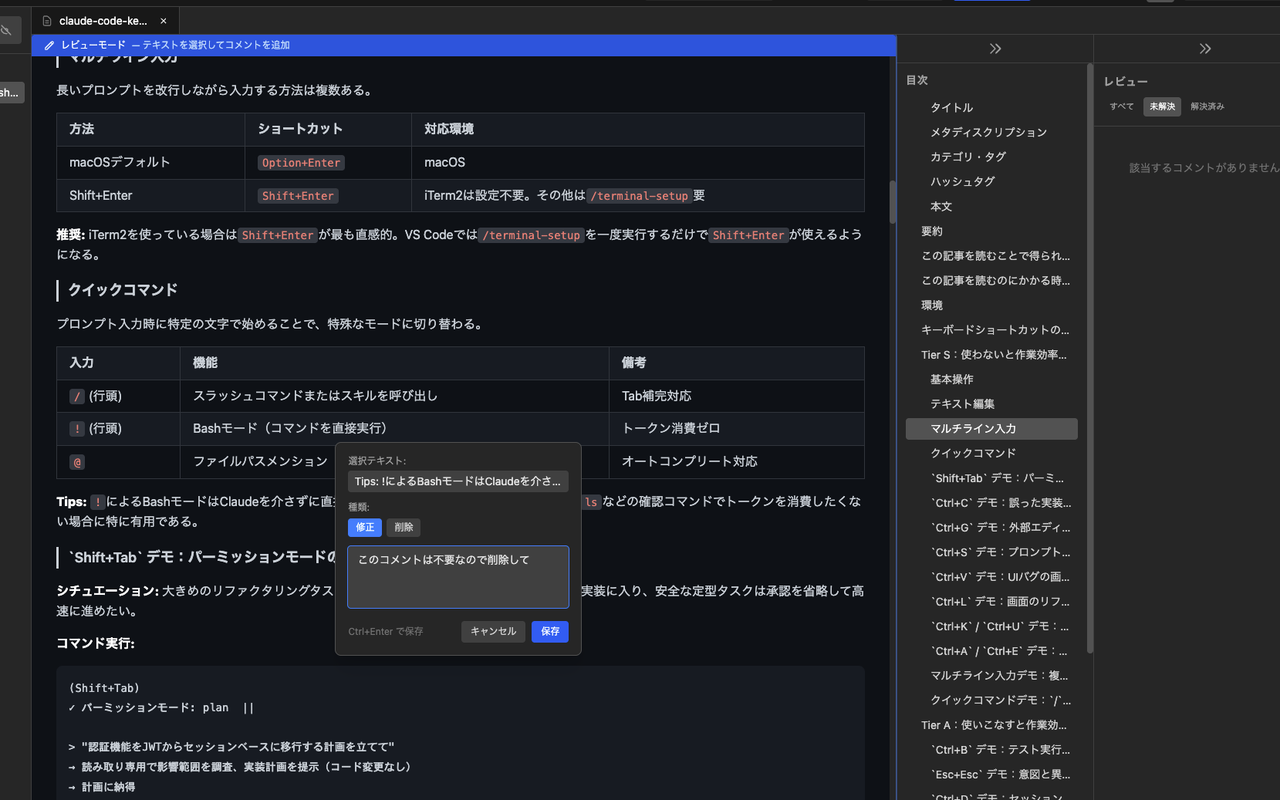
プレビュー上でテキストを選択してレビューコメントを追加。「修正」「削除」の2種類のコメントで指示を記録し、未解決コメントをAIエージェント向けの構造化指示書(Markdown / JSON)としてエクスポートできます。 Select text in the preview to add review comments. Record instructions with "Modify" and "Delete" comment types, then export unresolved comments as structured AI agent instructions in Markdown or JSON format.

  • テキスト選択でレビューコメントを即追加 Add review comments instantly by selecting text
  • 「修正」「削除」の2種類のコメントタイプ Two comment types: "Modify" and "Delete"
  • 未解決 / 解決済みのステータス管理 Unresolved / resolved status management
  • コメント対象箇所をハイライト & クリックでスクロール Highlighted anchors with click-to-scroll navigation
  • AIエージェント向け指示書としてエクスポート(Markdown / JSON) Export as AI agent instructions (Markdown / JSON)
  • IndexedDBでコメントを永続化・自動復元 Comments persisted via IndexedDB & auto-restored
review-comments
Review comments and AI export
🎨 テーマ Themes

25種類のテーマ +
カスタムテーマ
25 Themes +
Custom Themes

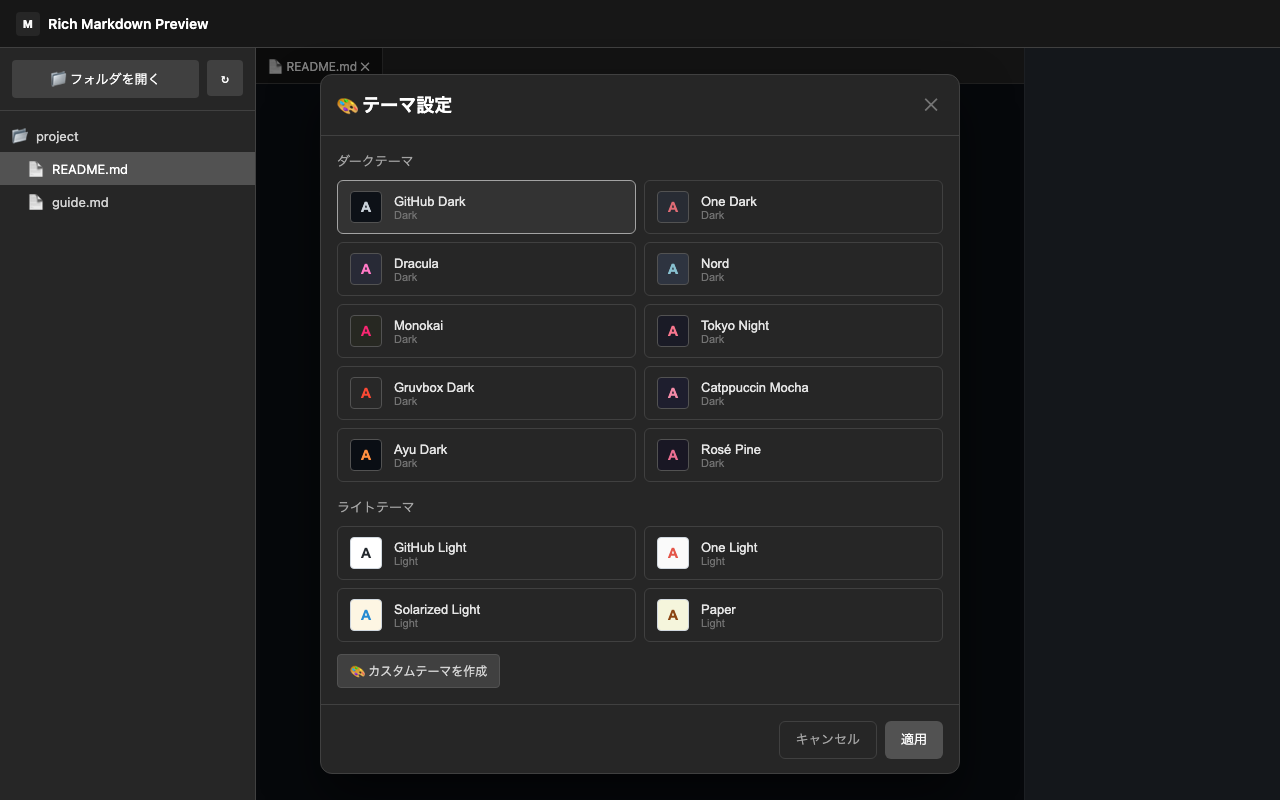
GitHub Dark/Light、Dracula、Nord、Tokyo Night、Monokai、Catppuccinなど人気テーマを網羅。カスタムテーマでは21の色要素を個別設定可能。H1〜H6の見出し色を個別に指定できる拡張はほぼ存在しません。 Popular themes including GitHub Dark/Light, Dracula, Nord, Tokyo Night, Monokai, and Catppuccin. Custom themes with 21 individually configurable color elements — almost no other extension lets you set H1–H6 heading colors separately.

  • ライト10種 / ダーク15種を瞬時に切り替え 10 light + 15 dark themes — switch instantly
  • 21の色要素を個別にカスタマイズ 21 color elements individually customizable
  • アクセント・テキスト・背景・ボーダー色の一括設定 Bulk color settings for accent, text, background, and border
  • カスタムテーマの保存・管理・削除 Create, save, manage, and delete custom themes
themes
Theme selection
📁 ファイル管理 File Management

統合エディタのような
フォルダ管理 &タブ管理
Integrated editor-like
folder management & tab management

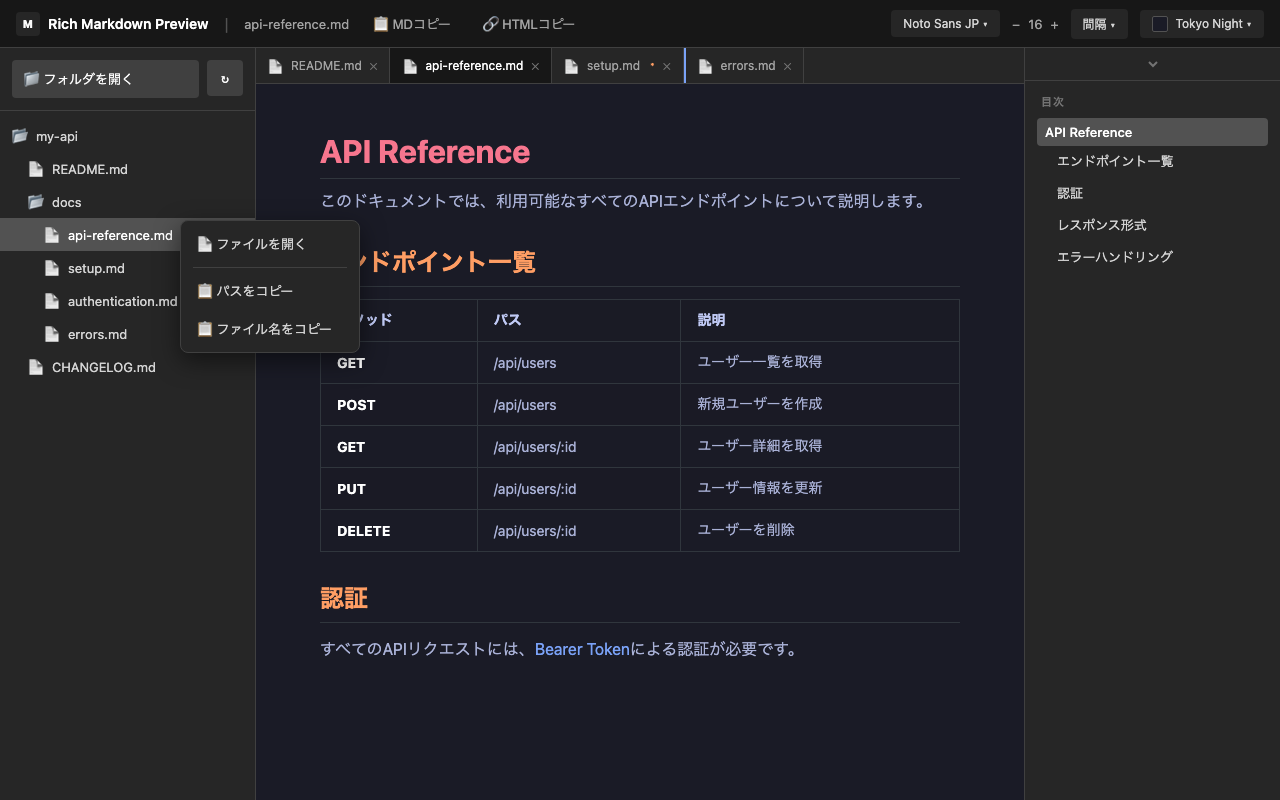
フォルダを選択するだけでMarkdownファイルをツリー表示(最大5階層)。複数ファイルをブラウザライクなタブで管理。ドラッグ&ドロップで並べ替え。前回のセッションを自動復元。 Select a folder to display Markdown files in a tree view (up to 5 levels deep). Manage multiple files with browser-like tabs. Drag and drop to reorder. Automatically restores your previous session.

  • .md / .markdown / .mdx / .mkd に対応 Supports .md / .markdown / .mdx / .mkd
  • エディタでの保存を1秒以内に自動検知 Auto-detects file changes within 1 second
  • 隠しファイルの表示/非表示切り替え Toggle hidden files (dotfiles) on/off
  • リフレッシュボタンで最新状態を即時反映 Refresh button for instant directory updates
  • 右クリックでファイルパス・ファイル名をコピー Right-click to copy file path or filename
  • フォルダ・タブを次回起動時に自動復元 Folders & tabs auto-restored on next launch
file-browser
Folder and tab management

他の拡張機能との違い How It Compares

一般的なMarkdownプレビュー拡張機能との比較 Compared to typical Markdown preview extensions

Rich Markdown Preview 一般的な拡張 Typical Extensions
フォルダ管理 & ライブ同期 Folder management & live sync ツリー表示 + 1秒以内に自動反映 Tree view + auto-refresh within 1 second 単一ファイル / 手動リロード Single file / manual reload
タブ & セッション復元 Tabs & session restore 複数タブ + 次回起動時に自動復元 Multiple tabs + auto-restored on launch 1ファイルずつ / 毎回開き直す One at a time / start from scratch
テーマ & カスタマイズ Themes & customization 25種類 + 21要素を個別設定 25 presets + 21 color elements 数種類 / 背景色程度 A few options / background only
日本語フォント & テキスト設定 Japanese fonts & text settings 5書体 + サイズ・行間・文字間隔 5 typefaces + size, height, spacing 未対応が多い Rarely supported
目次 + スクロール同期 TOC + scroll sync リアルタイム追従 Real-time tracking 静的な目次 Static TOC
Mermaidダイアグラム Mermaid diagrams テーマ自動切替対応 With auto theme switching 未対応が多い Rarely supported
レビューコメント Review comments テキスト選択で即追加 + AI指示書エクスポート Select text to add + AI instruction export 未対応 Not supported

使い方 How to Use

4つのステップで簡単に始められます。 Get started in just 4 simple steps.

1

拡張機能をインストール Install the Extension

Chrome Web Store からインストールして、拡張機能のアイコンをクリック。 Install from Chrome Web Store and click the extension icon.

2

フォルダを開く Open a Folder

「フォルダを開く」からMarkdownファイルが含まれるフォルダを選択。デスクトップからファイルをドラッグ&ドロップして開くことも可能。 Select "Open Folder" to choose a folder containing your Markdown files. You can also drag and drop files from your desktop to open them.

3

ファイルを選択 Select a File

ファイルリストからプレビューしたいファイルを選択。 Select a file from the list to preview it instantly.

4

カスタマイズ Customize

お好みのテーマやフォントを設定してお楽しみください。 Customize your theme and font settings to your liking.

💡 ヒント: ファイルを直接ブラウザにドラッグ&ドロップで開くこともできます。 💡 Tip: You can also drag and drop files directly into the browser to open them.
🛡️

プライバシーを最優先に Privacy First

Rich Markdown Preview はユーザーのプライバシーを尊重します。データを外部に送信せず、すべてのデータはローカルに保存されます。 Rich Markdown Preview respects your privacy. No data is sent externally — everything is stored locally on your device.

外部データ送信なし No external data transmission
インターネット接続不要 No internet required
ローカル保存のみ Local storage only
DOMPurifyで悪意あるスクリプトを無害化 DOMPurify sanitizes malicious scripts
プライバシーポリシーの全文を読む → Read the full Privacy Policy →